


You have brand guidelines. Somewhere. A PDF from two years ago, maybe a Notion page the design contractor set up before leaving. It has the logo in three sizes, two hex codes that might be current, and a paragraph about “being approachable yet professional” that could describe literally any company.
Nobody on the team opens it. Designers eyeball colors from the live site. Writers guess at tone. Every piece of content becomes a mini-negotiation: “Is this too casual? Should we use ‘we’ or the company name? Do we capitalize that?” And when you bring in a new agency, freelancer, or AI tool, you hand them that dusty PDF and hope for the best.
The problem is that brand guidelines were designed for humans who read documents. Your marketing stack in 2026 includes AI writing tools, vibe coding sessions, and content workflows that run on structured data — not vibes. A PDF with “our primary color is blue” doesn’t help Claude Code build a landing page that actually looks like your brand. A paragraph about “conversational tone” doesn’t help an AI produce copy that sounds like your founder.
What you need are two things: a visual identity system (how your brand looks) and an editorial voice system (how your brand sounds) — both structured enough that humans and machines can use them consistently. That’s what the brand-kit and tov-guidelines skills produce.
How it works — visual identity extraction
The brand-kit skill takes a screenshot-first approach. You feed it 3-5 screenshots of the company’s website — homepage, about page, pricing page, a feature page — and Claude’s vision analyzes the actual pixels.
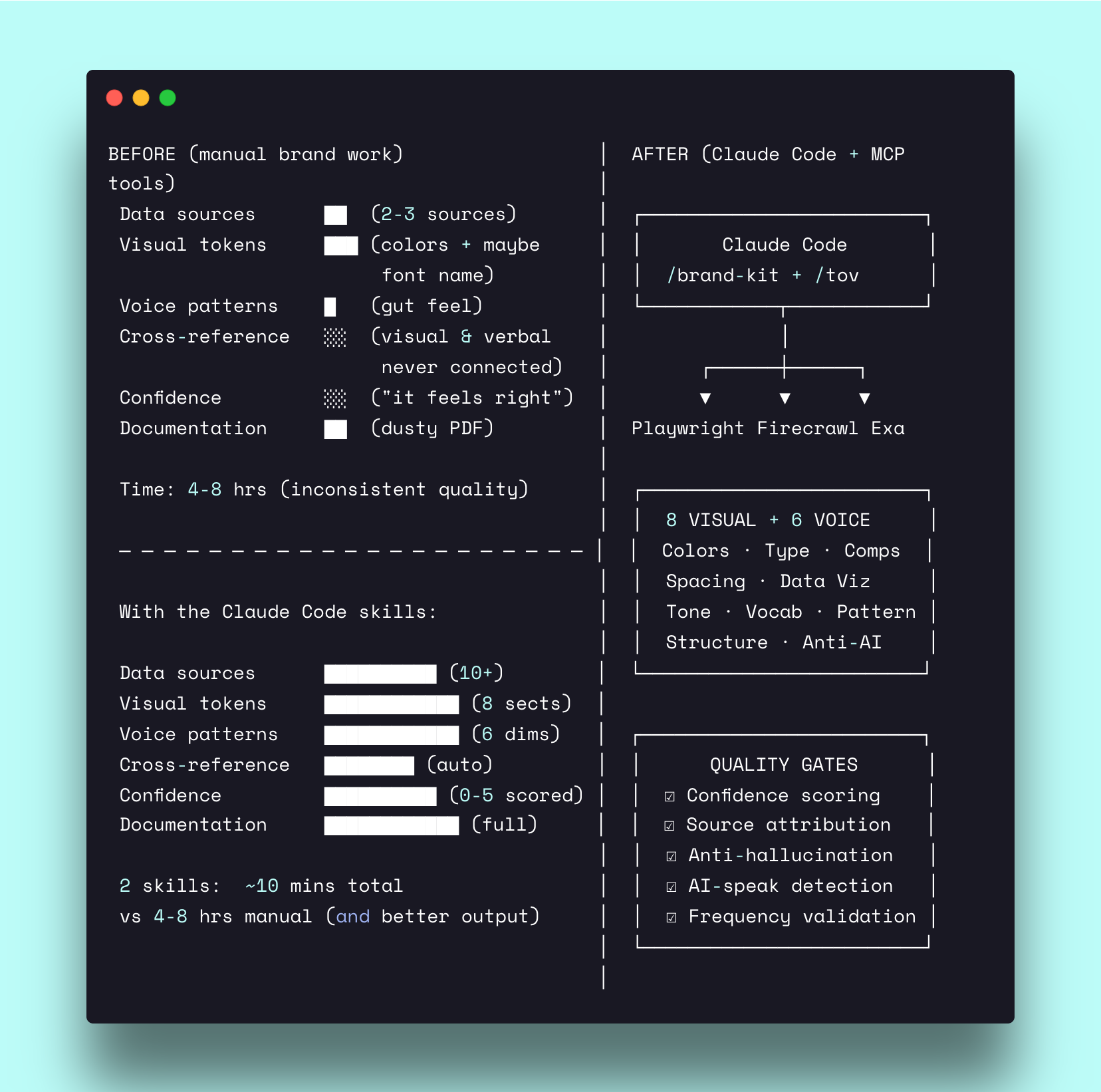
Why screenshots instead of scraping CSS? Because what you *see* is the source of truth. CSS gets compiled, overridden, conditionally loaded. A Framer site injects styles dynamically. A Tailwind build compiles utility classes away. But a screenshot of the live homepage shows you exactly what a visitor sees — the real colors, the actual spacing, the true typography.
The skill extracts across eight sections:
Section 0: Visual identity description — a natural-language design brief written for vibe coding reproduction. Not “modern and clean” but “dark velvet backgrounds with strategic spotlights picking out what matters — the visual equivalent of a founder who wears a quality black t-shirt instead of a suit.” Specific enough that an AI tool can recreate the aesthetic from the description alone.
Section 1: Colors — primary palette (8-15 colors) with hex values, text colors, color ramp, dark/light mode rules. Every color gets a confidence score from 0-5.
Section 2: Typography — typefaces with fallback stacks, type scale (at least 5 sizes), letter spacing, CSS quick reference.
Section 3: Components — primary button, secondary button, cards, navigation — each with CSS code blocks you can copy directly.
Section 4: Data visualization — chart color ramp, container styles, label fonts. Because dashboards and reports need brand consistency too.
Section 5: Logo usage — variants, rules, file paths.
Section 6: Spacing — base unit, scale, container widths. The rhythm that makes a design feel intentional.
Section 7: Signature elements — the 3-5 visual details that make this brand instantly recognizable. Gradient rays behind hero text. A scrolling logo marquee. Tab-based service navigation. These are the elements a designer copies first and a copycat misses entirely.
The confidence layer
Every extracted token gets a confidence score:
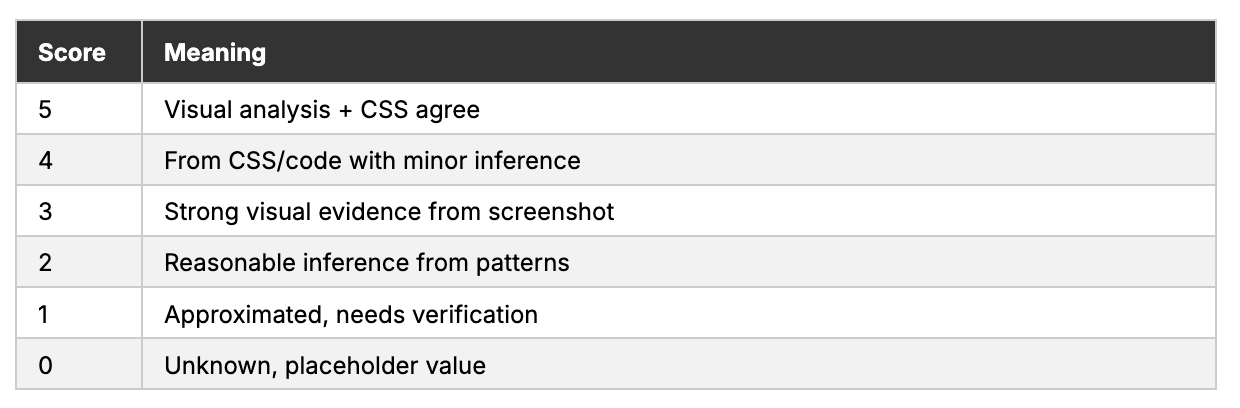
The skill never invents a hex value. If it can’t extract a color with confidence, it marks it [NEEDS VERIFICATION] with its best approximation. Same for fonts — if the typeface can’t be identified, the skill describes the letterform shape and suggests likely candidates, clearly flagged.
When CSS extraction is available as a supplement (user provides the URL alongside screenshots), the skill cross-references both sources. Where they agree, confidence jumps to 5. Where they disagree, the screenshot wins — because the screenshot is what the visitor actually sees.
How it works — visual identity extraction
The tov-guidelines skill takes a two-phase approach. Phase 1 extracts evidence. Phase 2 generates guidelines. A human review gate sits between them — because voice patterns need validation before they become rules.
Phase 1: Analysis
The skill scrapes 15-20 pages from the company’s website, prioritized by voice signal density:
Homepage and about/manifesto (core positioning, personal voice)
Blog posts (3-5) for long-form voice
Case studies (2-3) for proof presentation style
Pricing and services for commercial tone
FAQ for conversational tone
Then it extracts patterns across four levels:
Sentence-level — average sentence length, first-person vs. third-person usage, question frequency, imperative usage. Not “they write short sentences” but “12 words average, first-person ‘I’ on 5 of 6 pages (83%), 2-3 questions per page.”
Paragraph-level — average length, opening patterns, transition patterns, evidence placement.
Word-level — recurring company vocabulary, customer vocabulary, banned/avoided words, modifier frequency.
Structural — header style (sentence case vs. title case), CTA placement and phrasing, proof stacking patterns, section organization.
Every finding gets a frequency score:
High (80%+) — pattern appears across most page types
Medium (40-79%) — pattern appears on some pages
Low (<40%) — pattern appears rarely
Conflict — contradictory patterns found
Conflicts are flagged, not hidden. If the homepage uses “I” but the pricing page uses “we,” the analysis says so. If blog posts are 200-word casual reads but case studies are 1,500-word formal reports, that inconsistency gets documented with source URLs for each.
Phase 2: Generation
After the user reviews Phase 1 findings — correcting any misidentified patterns, resolving inconsistencies, answering gap questions — the skill generates the final guidelines document.
The document answers six critical questions:
Who’s actually reading? — primary reader definition with job title, challenges, goals
What does tone sound like? — before/after examples, not adjectives
What patterns repeat vs. vary? — pattern library with LLM-specific guidance
What words actually used? — vocabulary with company terms, customer terms, banned words
What structure fits? — opening patterns, body structure, CTA style
What to refuse? — anti-patterns with specific phrases to avoid
That last question is where the skill gets genuinely useful for AI-assisted content. Every TOV document includes an AI-speak detection section — the structural patterns that instantly read as machine-generated:
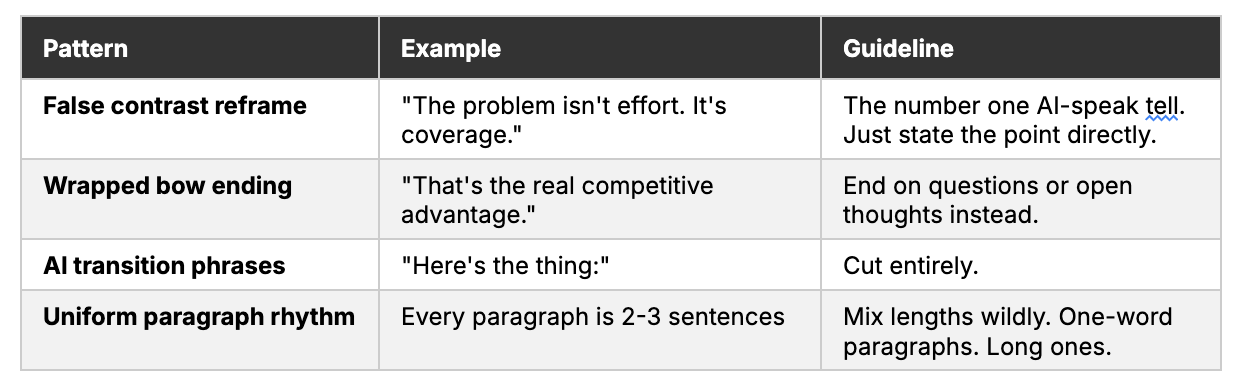
Every guideline traces back to a source URL from Phase 1. No invented examples. No floating claims. If someone questions why the guidelines say “use first-person ‘I’” — the source says it appeared on 5 of 6 pages at 83% frequency, with the URLs listed.
See it in action
Company: Linear (linear.app) — the issue tracker that engineers actually want to use.
Input: Website URL only. No upstream research required.
Extraction: Homepage, case studies, pricing, integrations, G2 reviews (196 reviews, 4.5/5), solutions pages, and partner references.
The skill identified 22 High-confidence data points, 14 Medium, and 5 Low — a confidence score of 4 out of 5.
Visual extraction (brand-kit)
Three screenshots analyzed: homepage, features page, changelog.
Visual identity description excerpt:
Dark, focused, and premium. The design feels like a mission control center for serious builders — purposeful without being cold.
Visual metaphor: “A high-end audio mixer in a professional recording studio at night — every element precisely placed, dark surfaces that recede, and purple accent lights that guide your attention.”
Deep black backgrounds create infinite depth while the signature purple (#5E6AD2) marks every action point — buttons, links, and progress indicators. The purple doesn’t overwhelm; it guides. Gray text (#8A8F98) stays readable but recessive, creating clear hierarchy.
Extracted tokens (excerpt):
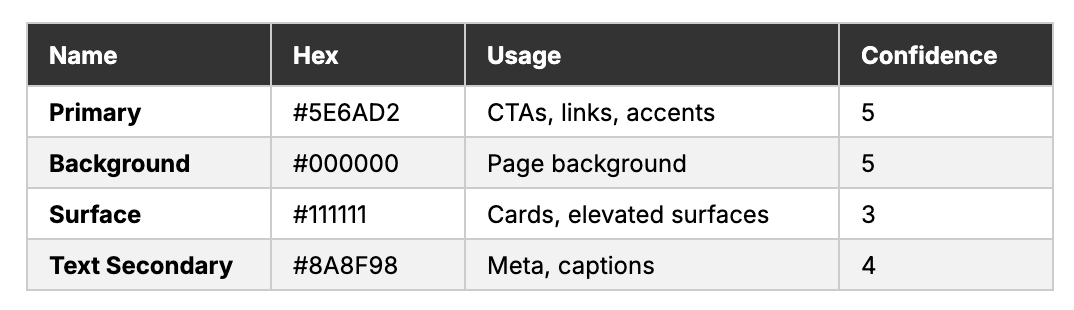
Signature elements: Keyboard-first UI animations. The gradient mesh backgrounds. Status-colored issue labels. Minimal chrome with maximum information density.
Prompt for reproduction:
“Create a dark-themed project management interface with mission control aesthetics. Use pure black (#000000) backgrounds. Primary accent is muted purple (#5E6AD2) — never loud, always guiding. Cards on slightly lighter surfaces (#111111). Typography is tight, geometric, with aggressive tracking. Every pixel serves function. The design should feel fast even standing still.”
That description — plus the full token inventory — is enough for a vibe coding session to produce a landing page that *feels* like Linear without copying any specific element.
Voice extraction (tov-guidelines)
15 pages analyzed: homepage, about, blog (5 posts), changelog (3 entries), docs landing, careers, customers, pricing.
Key findings (Phase 1 excerpt):
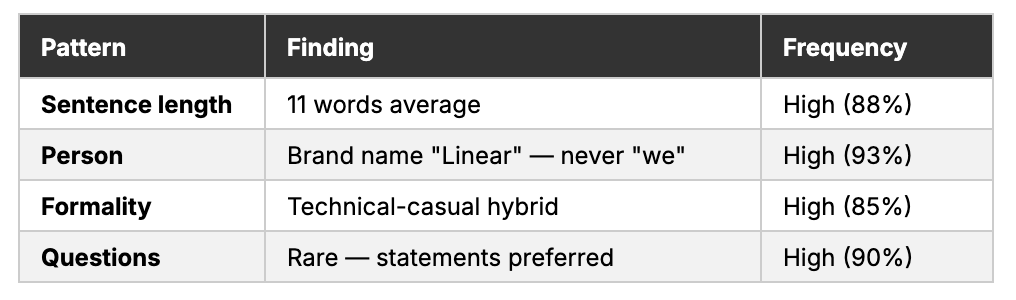
Voice-in-action example:

Anti-patterns identified: No superlatives (”best,” “leading,” “revolutionary”). No excitement language (”thrilled,” “excited,” “game-changing”). No feature bragging — features are stated, not sold. Writing that sounds like an engineer wrote it because an engineer *did* write it.
Output: A complete TOV guidelines document with sentence patterns, vocabulary lists, structural templates, and an AI-speak filter — all sourced to specific URLs, all frequency-scored.
When to use it
First week of a new client engagement — run both skills before positioning, messaging, or content strategy. The brand-kit feeds landing page wireframes, mockups, and vibe coding. The TOV guidelines feed every content skill. Without these, every downstream output starts from scratch.
When multiple people create content for the same brand — two writers, an agency, a freelancer, and Claude Code all producing “on-brand” work without a shared system means five different interpretations of the brand. The structured outputs from both skills become the single source of truth everyone references.
After a rebrand, product expansion, or founder transition — when the visual identity or voice has evolved but the documentation hasn’t caught up. Run brand-kit to capture the new visual reality. Run tov-guidelines to extract the current voice patterns. Update the system, and every downstream tool inherits the changes automatically.
Get the Skill
Both skills are open source on GitHub:
Brand Kit — visual identity extraction (8 sections, confidence scoring, screenshot-first)
TOV Guidelines — editorial voice extraction (two-phase, 6 questions, frequency scoring)
Save each SKILL.md to your `.claude/skills/` folder, then run `/brand-kit` or `/tov-guidelines` in Claude Code. The skills handle inputs, source chains, and quality gates automatically.
These are two of 90+ GTM skills I’ve built in Claude Code to run positioning, content, and launches for Series A-C SaaS companies. The brand system they produce feeds landing pages, LinkedIn content, sales materials, and every other deliverable — once extracted, it compounds across everything.
If you need the whole system — or someone to run it for your brand — let’s talk.