


You’ve got the persona doc. One page, maybe two. A cartoon avatar named “Marketing Mary” with a job title, three pain points, and a quote you wrote yourself because you couldn’t find a real one. The sales team has never opened it. The content team doesn’t reference it. And every time someone asks “who’s our ICP?” in a meeting, three people give three different answers.
The problem isn’t that you haven’t done ICP work. It’s that most ICP work produces a static document built on assumptions — not a structured research output built on verified data from your actual customers.
When ICP research is systematic, everything downstream sharpens. Positioning lands because it’s grounded in real buyer language. Outreach converts because pain points come from G2 reviews, not brainstorms. Content resonates because you’re writing to people whose jobs, challenges, and buying triggers you’ve actually documented — with sources.
This is the skill I run at the start of every client engagement. It produces a 12-section ICP report with TAM analysis, firmographic segments, champion and economic buyer deep-dives, negative ICP criteria, and intent signals — all sourced, all confidence-rated. And now it’s systematized in Claude Code.
How it works — step by step
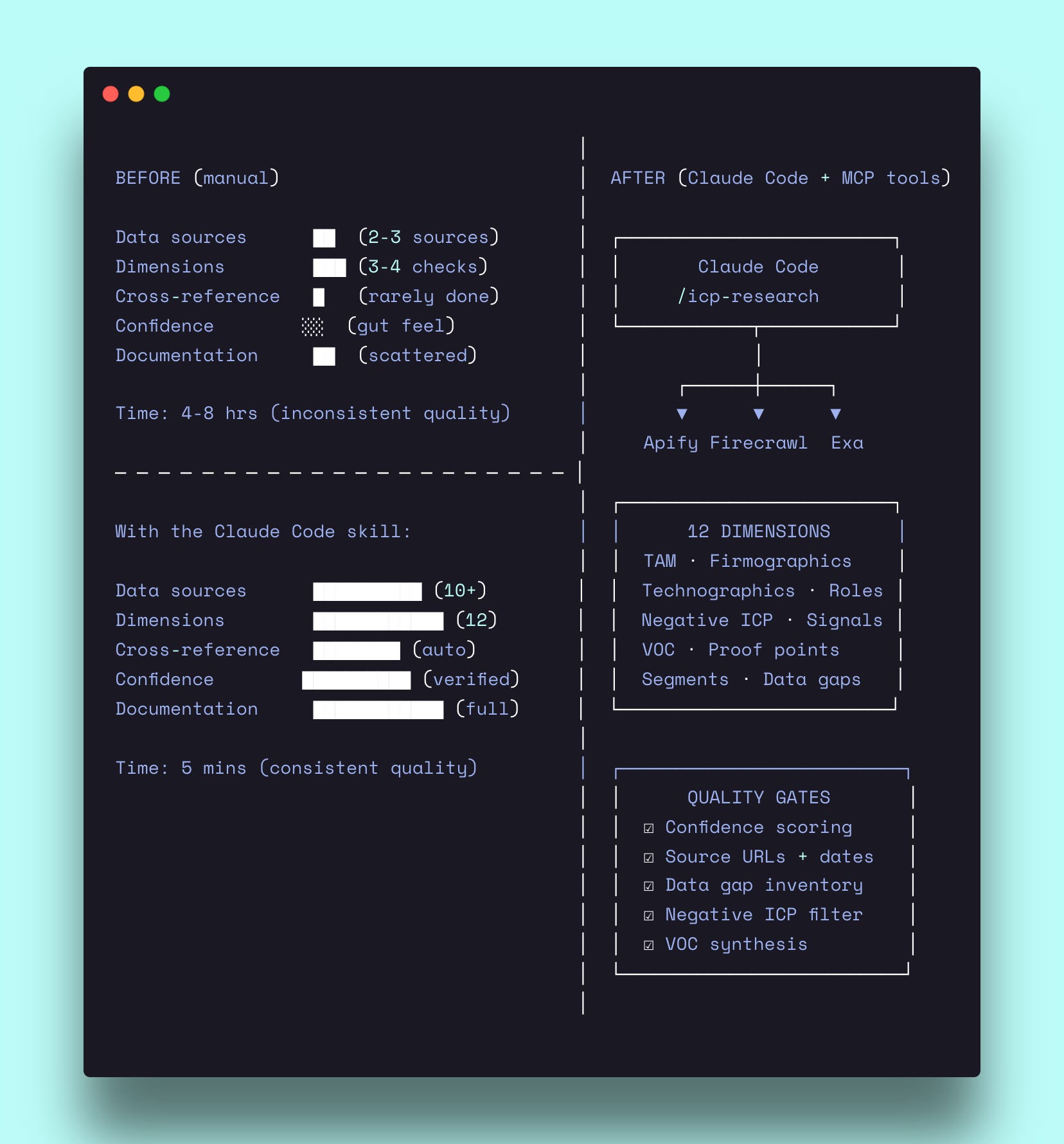
The skill runs in three phases. Phase 1 extracts everything the company’s website and third-party sources already tell you. Phase 2 synthesizes that raw data into structured segments, personas, and signals. Phase 3 assembles the final 12-section report with confidence levels on every claim.
Phase 1: Extract everything the website already tells you
Before analyzing anything, the skill fetches at minimum eight pages from the target company’s website: `/customers`, `/case-studies`, `/solutions`, `/use-cases`, `/pricing`, `/integrations`, `/industries`, and the homepage.
Each page serves a specific purpose. The customers page gives you named logos — the foundation for firmographic analysis. Case studies are the richest source: they contain job titles (personas), quantified outcomes (proof points), and verbatim quotes (voice of customer). The pricing page reveals value metrics, tier logic, and size indicators. The integrations page maps the adjacent tech stack.
Then it searches externally. G2 reviews are where buyers describe problems in their own language — not the polished version marketing invented. Capterra adds volume. Reddit threads surface segments the company doesn’t publicly claim. LinkedIn company pages and job postings reveal hiring signals and growth patterns.
For each data point extracted, the skill records three things: the data itself, the source URL, and the access date. No floating claims. If the source is a case study, you get the URL. If it’s a G2 review, you get the URL. If the data doesn’t exist, the skill writes “Not available” — never an invention.
After extraction, all attributes get normalized. Geography maps to standard regions (US, EMEA, APAC, LATAM, Global). Industries map to a fixed vertical list. Company sizes normalize to revenue bands and employee counts. This normalization is what makes cross-company and cross-segment analysis possible.
Phase 2: Analyze across 12 dimensions
This is where the skill separates from a typical persona exercise. Instead of one dimension (buyer profile), it researches twelve.
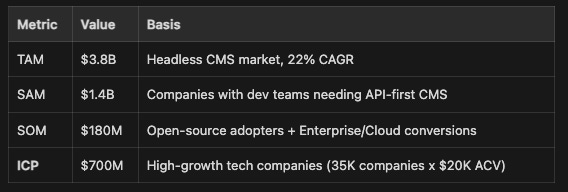
TAM analysis. The skill calculates total addressable market using either bottom-up (customer count x average contract value) or top-down (market size x addressable share) methodology. But the key output isn’t the TAM number — it’s the ICP row below SOM. That’s the highest-priority segment based on everything the research surfaces. Each layer (TAM, SAM, SOM, ICP) gets a targeting strategy, so the numbers aren’t just academic — they tell you where to allocate effort.
Firmographics with segment deep-dives. Geography, industry, and company size tables — each with evidence URLs and confidence levels. But the skill goes deeper than tables. For each company segment (Enterprise, Mid-market, SMB), it produces a structured deep-dive: priorities within today’s market trends, ICP-fit rationale, budget and sales cycle expectations, unique targeting approach, and proof points with named customer outcomes. These deep-dives are what make the research actionable for sales and marketing — not just descriptive.
Technographics. Required vs preferred tools by category: CRM, analytics, data warehouse, cloud, marketing automation, e-commerce. This tells you which technology prerequisites indicate fit and which tools appear alongside the product. If you’re selling to companies that use Snowflake and Segment, that’s a technographic signal worth filtering on.
Champion and Economic Buyer deep-dives. This is the core persona work — and it’s significantly deeper than a standard persona slide.
The Champion deep-dive has 12 explicit fields: titles, department and team size, responsibilities, jobs to be done, success metrics, challenges, pain points, current alternatives, problems with alternatives, buying behavior, channels and influences, and a verbatim testimonial. Channels and influences is where it gets specific — not just “they read blogs” but which LinkedIn groups, which Slack communities, which podcasts, which events, which influencers they follow.
The Economic Buyer deep-dive has 13 fields. It adds three that Champions don’t get: “what they actually care about” (the real decision drivers beyond stated concerns), “common objections” (typical pushback during sales), and “what a no-brainer looks like” (the conditions that make budget approval easy). These three fields are worth the entire research project for a sales team.
Negative ICP. Identifying who is NOT a fit — with disqualification criteria, red flags from churned customers, and objection patterns that signal poor fit versus legitimate concerns. Most ICP work skips this entirely. The negative ICP is what stops your sales team from wasting cycles on deals that were never going to close.
Intent signals. Company-level events (new executive hire, funding announcement, tech stack change, M&A activity) and persona-level behaviors (role change, LinkedIn posts about relevant challenges, competitor content engagement). Each signal gets a detection source — where to actually find it — so the output feeds directly into prospecting workflows.
Voice of customer synthesis. Terminology patterns, pain point language, outcome language, and objection patterns — all verbatim, all sourced. This section is what makes your messaging authentic. When your landing page uses the same language your buyers use in G2 reviews, conversion improves because the copy matches how they think about the problem.
Phase 3: The anti-hallucination layer
Every claim in the final report gets one of three confidence levels:
High — Direct from official source, verifiable (case study, pricing page, press release)
Medium — Third-party source, multiple signals (G2 review, news article, community mentions)
Low — Single indirect source, inferred (forum mention, job posting, analyst estimate)
The report opens with a confidence score (1-5) calculated from the ratio of High to Low data points. If you’ve got 70%+ High confidence data, you’re at a 5. If it’s mostly Low, you’re at a 1.
Section 11 (Data Gaps) is mandatory. It documents every piece of missing information: what was searched, why it matters, and how to fill the gap. “Not available — searched G2, Capterra, and company blog; no case studies found” is infinitely more useful than an invented data point.
Section 12 (Source Appendix) lists every URL accessed, with dates and what was extracted. This means anyone reviewing the research can verify any claim by clicking the source link.
The tools running in the background — and what they cost
The ICP research skill uses web scraping and search tools to extract data from company websites, review sites, and third-party sources. Three MCP servers handle the heavy lifting.
Apify — the primary scraping engine
Apify is a marketplace of 3,000+ pre-built web scrapers called “Actors.” The skill uses Apify to scrape case study pages, G2 reviews, customer logo sections, and pricing pages — anything where structured data extraction is faster than manual reading.
For ICP research specifically, Apify handles:
Deep site crawling via the RAG Web Browser Actor (fetches and parses entire sections of a site)
G2 and Capterra review extraction (structured JSON with reviewer titles, company sizes, quotes)
LinkedIn company data scraping (employee counts, job postings, growth signals)
Setup (5 minutes): Create an account at apify.com → Settings → API Token → add as remote MCP server in Claude Code.
Cost: Free tier gives $5/month. A full ICP research run — scraping 8-10 pages, pulling G2 reviews, extracting LinkedIn data — runs about 6-8 Actor calls. The free tier handles one full research run per week comfortably.
Firecrawl — browser rendering for JavaScript-heavy pages
Some pages (especially interactive pricing calculators, dynamic customer showcases, and review sites) are JavaScript-rendered — direct HTML fetches return nothing. Firecrawl spins up a headless browser to render and extract these pages.
Setup (5 minutes): Create an account at firecrawl.dev → copy API key → add as remote MCP server.
Cost: Free tier gives 500 credits. One page scrape = 1 credit. A typical ICP research run uses 30-60 credits depending on how many JavaScript-heavy pages need rendering.
Exa — semantic search for finding what Google misses
Exa is a search engine built for AI workflows. Where Google returns pages, Exa returns structured answers. For ICP research, it surfaces niche community discussions, analyst reports, and comparison articles that standard searches miss.
Setup (2 minutes): Create an account at exa.ai → add as remote MCP server.
Cost: Free tier gives 1,000 searches/month. An ICP research run typically uses 10-20 searches.
All three services connect as remote MCP servers. Claude Code calls them automatically when the skill needs them. You don’t manage API calls or parse HTML — the skill handles the tool chain and fallback logic.
See it in action
Company: Strapi (strapi.io) — the leading open-source headless CMS
Input: Website URL only. No upstream research required.
Extraction: Homepage, case studies, pricing, integrations, G2 reviews (196 reviews, 4.5/5), solutions pages, and partner references.
The skill identified 22 High-confidence data points, 14 Medium, and 5 Low — a confidence score of 4 out of 5.
What the research surfaced
TAM calculation (Section 2):
Champion deep-dive excerpt (Section 4):
Champion: Frontend Developer / Tech Lead. Titles include Full-Stack Developer, Engineering Team Lead, Backend Developer. Sits in Engineering, team of 3-15 developers. Measured on shipping velocity, code quality, and system reliability.
Pain points surfaced from G2 reviews: “WordPress is slow and inflexible.” “Manual code updates for content changes.” “Plugin compatibility issues.” Buying triggers: new project kickoff, WordPress migration, need for headless architecture.
Verbatim VOC: *”Honestly this is by far the easiest solution for jumping into the headless CMS world”* — G2 Review. *”Strapi save me so much time... easy to add tables and relations between them”* — G2 Review.
Negative ICP (Section 5):
Non-technical small businesses (no developer on team — Strapi requires technical implementation). WordPress loyalists expecting themes and plugins (different paradigm). Teams wanting all-in-one SaaS including frontend (headless = bring your own frontend). Companies with budget under $10K/year total (route to Community Edition only).
ICP segments with positioning recommendations (Section 8):
High-growth tech companies (35K companies, $20K ACV) — “The API-first CMS developers love. Ship faster, scale effortlessly, own your content infrastructure.”
Enterprise digital transformation (6K enterprises, $150K ACV) — “Consolidate your content infrastructure. One headless CMS for all channels, regions, and teams.”
Media and publishing (9K companies, $50K ACV) — “Content at the speed of news. Publish anywhere, update instantly, scale to millions of articles.”
Digital agencies (17.5K agencies, $20K ACV) — “Ship client projects faster. One CMS your team masters, every client benefits from.”
Output: Full 12-section report with segment prioritization, per-segment messaging recommendations, content strategy by segment, and outreach recommendations by channel. Ready to feed directly into positioning, messaging, and outbound workflows.
When to use it
First week of a new client engagement — run this before positioning, messaging, or content strategy. It establishes the customer foundation everything else builds on.
When your sales team targets everyone — the segment scoring matrix and negative ICP give sales a clear filter for who to pursue and who to disqualify, with evidence behind every criteria.
When positioning feels generic — if your homepage could belong to three different companies, the ICP research surfaces the specific language, pain points, and proof points that make positioning concrete instead of abstract.
Get the Skill
Want the full 12-section methodology, dimension schemas, search patterns, and output templates?
This is one of 50+ GTM skills I’ve built in Claude Code to run positioning, content, and launches for Series A-B SaaS companies. If you need the whole system, consider working with me.